
No plain text
Secrets are encrypted with AES-256-GCM under a separate nonce per record. Direct database access does not reveal a password. The master key is held neither in the database nor in source, but loaded from a container secret or KMS.
Secrets are stored under AES-256-GCM; viewing and copying take a separate permission and leave a trace.
The vault is a separate security area for device and account credentials. Secrets are never stored as plain text: each record is encrypted with AES-256-GCM under its own nonce. The SNMP and SSH credentials used for scanning do not live here but in the inventory connection profiles — human access and automation identity are deliberately kept apart. The vault is not the product catalogue, not a customer product and not the knowledge base: a secret belongs in the vault, not in an article.
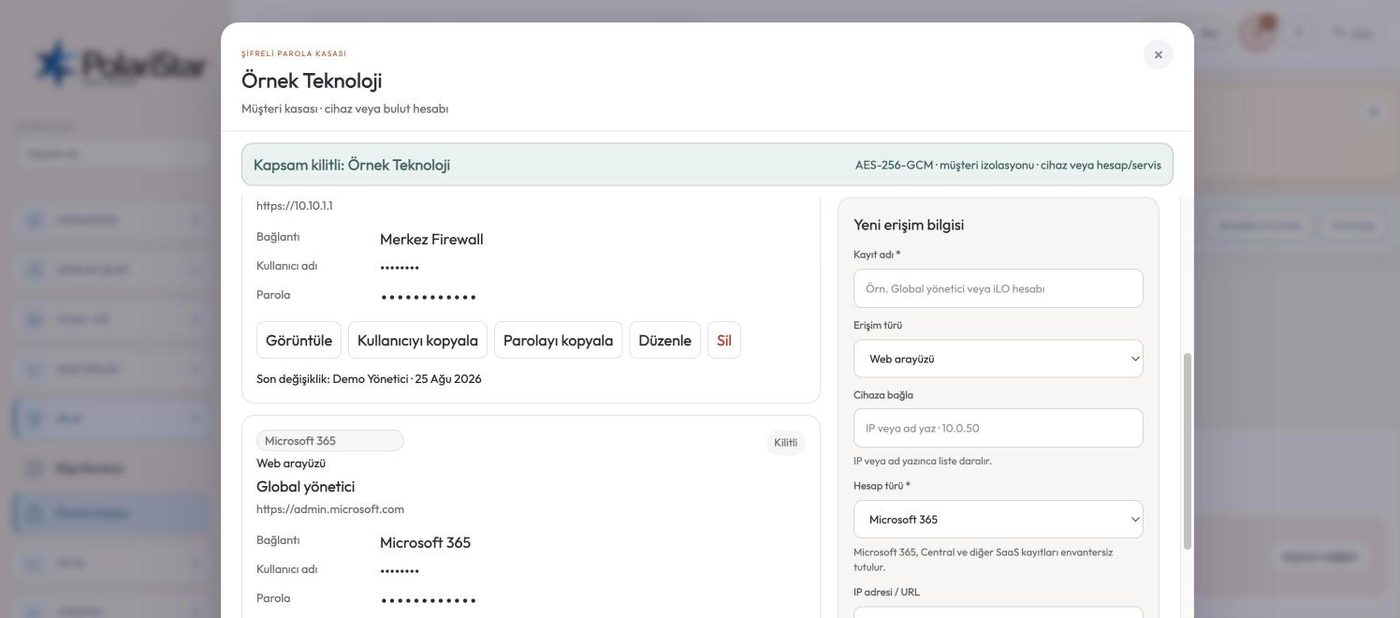
Secrets are encrypted with AES-256-GCM under a separate nonce per record. Direct database access does not reveal a password. The master key is held neither in the database nor in source, but loaded from a container secret or KMS.
The list API does not put the secret in its response. The default view is masked, with browser autocomplete and sensitive logging turned off. Retrieving a password is a separate request behind a separate permission.
Seeing the vault in the menu, opening a record’s password and managing it are distinct rights. Access hangs on two separately granted permissions rather than on a role name: one to view, one to manage. Viewing and copying ask you to authenticate again — an open session is not enough on its own.
Viewing, copying, editing, exporting and failed attempts all write an audit record. Who opened which record, and when, is kept. Access can be accounted for afterwards.
Every record belongs to a scope: the customer in MSP mode, the whole company in organisation mode. Scope is enforced in the API and query layer, not just by a filter in the interface. Calling the API directly will not reach another customer’s record either. Picking a scope uses the same two-step narrowing as inventory.
The SNMP community strings and SSH credentials used for device scanning sit in the inventory connection profiles, in their own encrypted columns. The vault is for access a person makes by hand: web and admin interfaces, SSH, RDP, iLO/iDRAC, hypervisors, VPN, switches and firewalls. Keeping the two apart stops one permission from quietly opening the other.
A vault record can be attached to an inventory device, a location and an access type. While you work on a device you reach its access record without hunting for it somewhere else. The link is optional, so a cloud account with no device behind it can live in the vault too.
The product rule is explicit: passwords, SNMP communities, private keys and customer secrets are not logged and not written into documents. A knowledge base article points at the vault record instead of embedding the password. Plain-text CSV export is off by default, and no real password is sent to any AI service.
We cannot. Secrets sit encrypted under AES-256-GCM, and the master key is loaded from a container secret or KMS rather than from the database or the source. Someone holding a database backup still cannot read a password.
No. Scanning credentials stay in the inventory connection profiles, in their own encrypted columns. The split is deliberate: access a person makes by hand and the identity automation uses are not tied to the same permission.
No. The customer portal is a narrow surface: their own requests, their own devices and published solutions. The vault is not among those views, and the scope limit is enforced in the API and query layer rather than in the menu.
In organisation mode the vault works as a single company-wide vault, with no per-customer stack. Opening a record’s password remains a separate permission; reaching the menu does not grant it.
The encryption model, the scope rules and the separation of permissions are written down as binding and enforced. The module is not opened in any customer installation until encryption and scope isolation have been verified independently — that rule is written into the product’s own development documents. A pre-pilot verification list is kept for this module.
IT managers who want device and account credentials in one encrypted, scoped place. Teams that have to account for who used an access, and when.
Let us open a workspace for you and try it with your own customers and devices. We will guide you through setup and data migration.