PolariStar — İstar Bilişim Türkçe Request a demo

← All modules

Service desk

Tickets

From the person who asked to the minutes spent — all on one record.

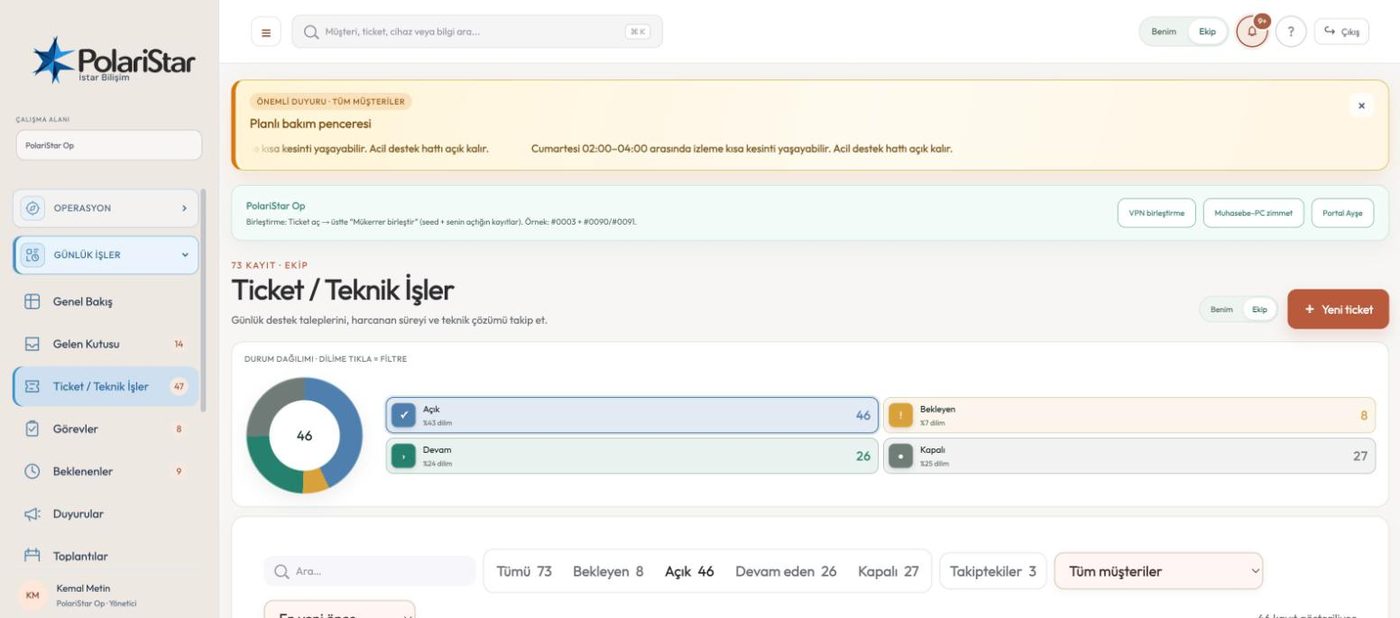
Tickets are the centre of PolariStar. A request is not just a title and a description: it attaches to a customer (a department in organization mode), to a named person there, and where it matters to a device in inventory. The waiting party, the work done, the time spent and the resolution all grow on the same record. The product principle is plain — keep the request, the person, the device, the intervention and the outcome in one operational record.

From the PolariStar panel, with demo data.

Tasks don't close tickets

Several tasks can be opened under one ticket over time. Finishing a task closes that task only; the ticket and the other linked tasks are untouched. This is not a setting but the data model: tickets and tasks are separate tables in the database.

Closing stays with people

A customer can report from the portal that the problem is solved, and the ticket does not close. The status becomes “customer resolution confirmed”, and the technical team checks it and closes it. The close comes with the closing summary of the person running the process.

Channel on every record

The source field holds seven values: phone, in person, internal, email, portal, other and unknown. Other is the catch-all for channels like WhatsApp and SMS. In the list, the “who opened it” chips roll those values up into coarse groups.

Filter from the ring

Open, in progress, waiting and closed sit as a ring above the list. Clicking a segment filters the list — there is no separate filter screen to visit. Counted filter chips, the customer picker and sorting sit on the same row below it.

The waiting party is explicit

When the status is Waiting, the party, the person involved and the action expected are their own fields. The Waiting screen gathers everything held up by a customer, your own team or a third party in one page, so whose court the ball is in has a single answer.

Work logs and time

Every intervention is recorded with date, owner and duration. Handovers and changes of owner land in the same log as their own lines, so you can see how the record passed from hand to hand. Time accumulates on the ticket.

Device linking is optional

A ticket can be attached to an inventory device, but it does not have to be. Internally only the selected customer's devices are listed; in the portal only those of the signed-in company. A device id outside that scope is rejected at the API.

Mine or Team

The scope switch in the top bar flips any list between what is assigned to you and what the whole team has. The Following chip separates records you want to watch without being assigned — following is not the same as ownership.

It feeds the report

The support report filters by owner: the whole team, one person, or unassigned records. It exports to Excel and CSV with the owner column included. Linked tasks and handovers never create new tickets, so your ticket counts stay honest.

The evidence chain behind one requestA seven-link flow: the request arrives by email, is matched to a person, linked to an inventory device, the network port is recorded, the work done and time spent are logged, a configuration backup preserves the before and after state, and a service report comes out at the end. Every link lives in one record.The trail of one request — seven links, one record1Request arrivesThe customer emails in.It lands in the inbox,not a ticket yet.2Person matchedThe operator links it toa client and a contact.3Device linkedThe request is tied to aninventory asset.4Network portThe interface and portstate are recorded.5Work and timeWhat was done and howlong it took are logged.6Before / afterConfig backups and portchanges are kept.7Service reportThe report is builtand sent out by email.Request, person, device, link, action, time, approval, backup and final report are held in a single chain.

The trail of one request, end to end

  1. 1The request landsA customer sends an email. It arrives in the inbox and is not yet a ticket; an operator turns it into one, dismisses it, or blocks the sender.
  2. 2The ticket is openedThe operator matches the customer and the contact, marks how the request arrived, and links a device from inventory if it matters. This is where the record gains its context.
  3. 3The work is split upA site visit, ordering a part and the configuration become separate tasks under the same ticket. One of them finishing leaves the others, and the ticket, open.
  4. 4The ball moves awayWaiting on a part from a supplier, the status becomes Waiting, with the party, the contact and the expected action written down. The record shows up on the Waiting screen instead of cluttering the open queue.
  5. 5The work is loggedThe engineer records what was done with date, owner and duration. Two engineers mean two lines, and both durations add up on the ticket.
  6. 6It closes and feeds reportsEven when the customer confirms the fix, the authorised person does the closing, writing the resolution and the closing summary. Time and owner flow into the support report.

Frequently asked

The linked task is done — why is the ticket still open?

Because it should be. A request usually consists of several pieces of work, and finishing one of them does not mean the request is resolved. A completed task closes itself, and a new task can be linked under the same ticket later.

The customer says it is fixed. Is it closed?

No. If the customer reports the fix from the portal, the ticket stays open and its status becomes customer resolution confirmed. The technical team checks it and decides on closing, which keeps the report separate from the verification.

Where do I put a request that came in over WhatsApp?

The Other value in the source field is the catch-all for channels like WhatsApp and SMS. If you genuinely do not know the channel, Unknown is there — you are not forced to mark the record as phone or email.

How do I total up the time spent?

Time is entered on each intervention and accumulates on the ticket. In the support report you can filter records by the whole team, a single owner or unassigned, and export to Excel or CSV. You do not add anything up by hand.

Who gets told, and when?

A ticket opened from the customer portal reaches the internal team by email. The requester is notified when the owner, the status, the plan or the resolution changes. Notification subscriptions are per user: being an admin does not mean receiving every ticket email.

Is it the same screen in organization mode?

Same engine, different vocabulary. In the organization surface the menu reads Requests and Waiting, departments replace customers, and customer resolution confirmation becomes user resolution confirmation. The fields and the flow stay the same.

Who it helps

Service desk engineers, team leads who distribute the work, and IT managers who need to measure resolution time.

Related modules

See it on your own operation

Let us open a workspace for you and try it with your own customers and devices. We will guide you through setup and data migration.