
Two separate report families
The support side holds tickets, time spent and the load on the technical team. The sales side holds quotes, wins, losses and margin. They draw on the same database but live in separate tabs behind separate permissions.
Support and sales reporting stay apart, and so do the roles that see them.
There are two report families: support reports cover tickets, time spent and team load; sales reports cover quotes, wins, losses and margin. They sit as two tabs on one screen because they are not open to the same people. The goal was set early: a customer should see a plain support summary of their own company only, while the internal team gets the detailed management view that compares customers. Accuracy here is a rule rather than a preference — how often a job changed hands shows up in the report without inflating the ticket count.
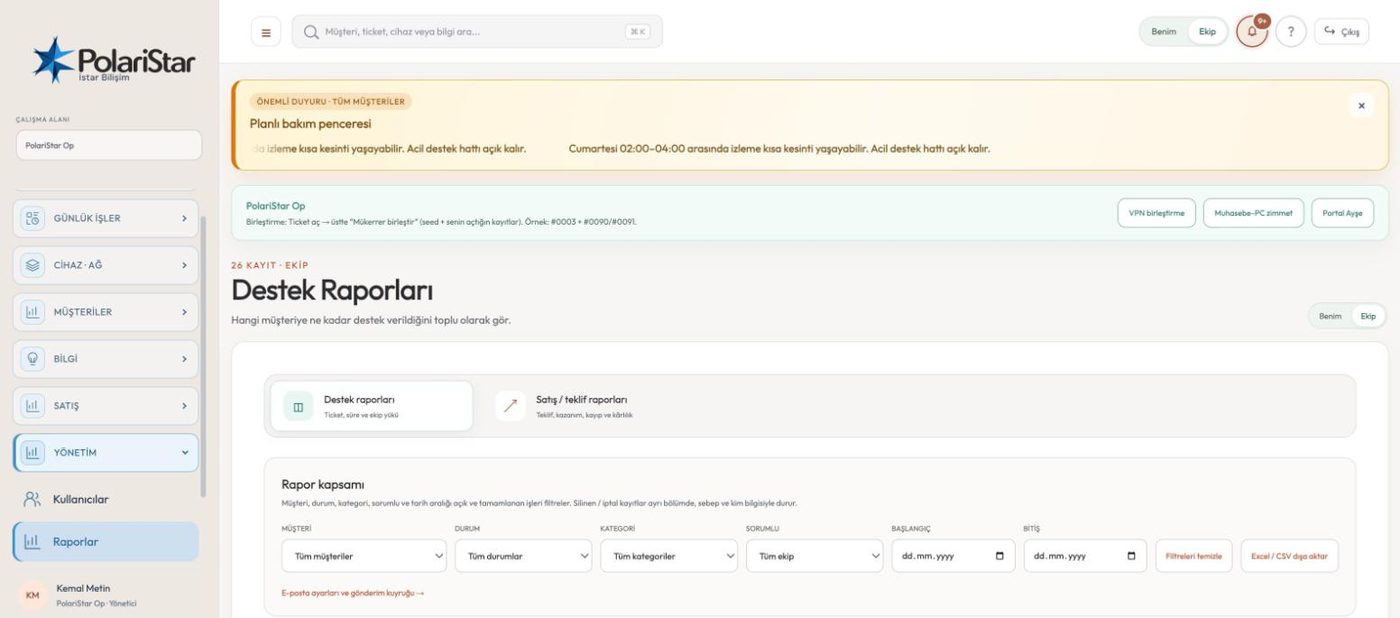
The support side holds tickets, time spent and the load on the technical team. The sales side holds quotes, wins, losses and margin. They draw on the same database but live in separate tabs behind separate permissions.
Opening a linked task under a ticket, or handing the record to another engineer, never creates a new ticket. Total tickets and tickets per engineer count tickets and nothing else. Handovers and owner changes appear as lines in the work log, so you can follow how the job moved without the number growing.
Technical users see support reports, sales sees sales reports, and administrators and limited administrators see both. Sale price, cost and profit are not shown to technical users; gross margin opens only to an authorised user. A limited administrator's report is cut further to the customer scope assigned to that user: names, counts and totals of customers outside that scope never enter the report. The restriction is not a hidden menu item but a limit enforced in the API and query layer.
Customer, status, category, owner and a start and end date sit on one row. Channel chips sit next to them: All, Email, Portal, Phone and Other. The Other chip groups in-person, internal, unknown and other records together, so work with an unclear origin is not blended into phone.
The owner filter takes three values: whole team, one person, or unassigned. Unassigned pulls out records nobody picked up. The same filter answers the workload question: you read how many open records sit with each person straight off the list.
For a single ticket you get a service report you can print or save as PDF. For the closing message you can prepare a short summary, a technical report or a management summary draft. Sending is not direct: the report becomes a Draft, an authorised user Approves it, then it is Sent. The queue and its error log are visible under the email delivery tab in settings.
A filtered support report downloads as Excel-compatible CSV, carrying Owner, Work logs and Linked tasks columns. Sales and quote reports export the same way, with quote lines marked by revision number as R1, R2, R3. The Excel export no longer depends on the browser.
Quotes sent, won and lost amounts, win rate, open pipeline and gross margin sit on one screen. Loss reasons and the performance of each sales owner are calculated by period, customer and owner. Sales users also get a per-customer summary of total tickets, open tickets and the date of the last one, without the technical text being opened.
Deleted and cancelled records are not quietly dropped from the report. They sit in a section of their own with the reason and the person behind it, which keeps the gap between two periods explainable.
No. Linked tasks and handovers never create a new ticket, so total tickets and tickets per engineer count tickets only. Handovers and owner changes appear as lines in the work log instead. You can see how many hands a job passed through without the number doubling.
No. A sales user gets a per-customer summary of total tickets, open tickets and the last ticket date; the problem text, the resolution and internal notes stay closed. It works the other way too: a technical user sees neither the sales report nor sale price, cost or profit.
No. A limited administrator reaches both report families, but the report is narrowed to the customer scope set for that user. Names, counts and totals of customers outside the scope do not enter the report.
Those are planned, not working features today. A weekly and monthly report draft queue, engineer workload measured alongside SLA risk, a customer health score and the plain report view in the customer portal are all on the roadmap. Today you prepare the period report yourself and send it through the approval queue.
The “accepted by SMTP” message in the interface is not a delivery guarantee; it only says the mail server took the message. For a definite answer, check the delivery log and, if needed, the recipient mailbox. SMTP settings, the connection check and the test email sit in an administrator-only tab.
Same engine, different vocabulary: departments replace customers and reports sit in the Organization menu. The sales group does not exist on the organization surface, so sales and quote reports do not come up in that mode; support reports are what remains.
Team leads, MSPs presenting service reports to their customers, and managers tracking quote wins and gross margin period by period.
Let us open a workspace for you and try it with your own customers and devices. We will guide you through setup and data migration.