PolariStar — İstar Bilişim Türkçe Request a demo

← All modules

Monitoring

Infrastructure Monitoring and Alerts

Read-only over SNMP, with no agent on the device.

The monitoring model is PRTG-like: a thin collector running on the customer network (the department network in company mode) polls devices read-only over SNMP. Forcing an agent or WMI onto every device was rejected on purpose — that choice is the difference between a rollout that finishes in an afternoon and one that drags on for months. Nothing is written to devices, credentials are held read-only, and the collector is the only component that reaches out. What it gathers feeds the device status, VLAN and port views, and the alerts screen.

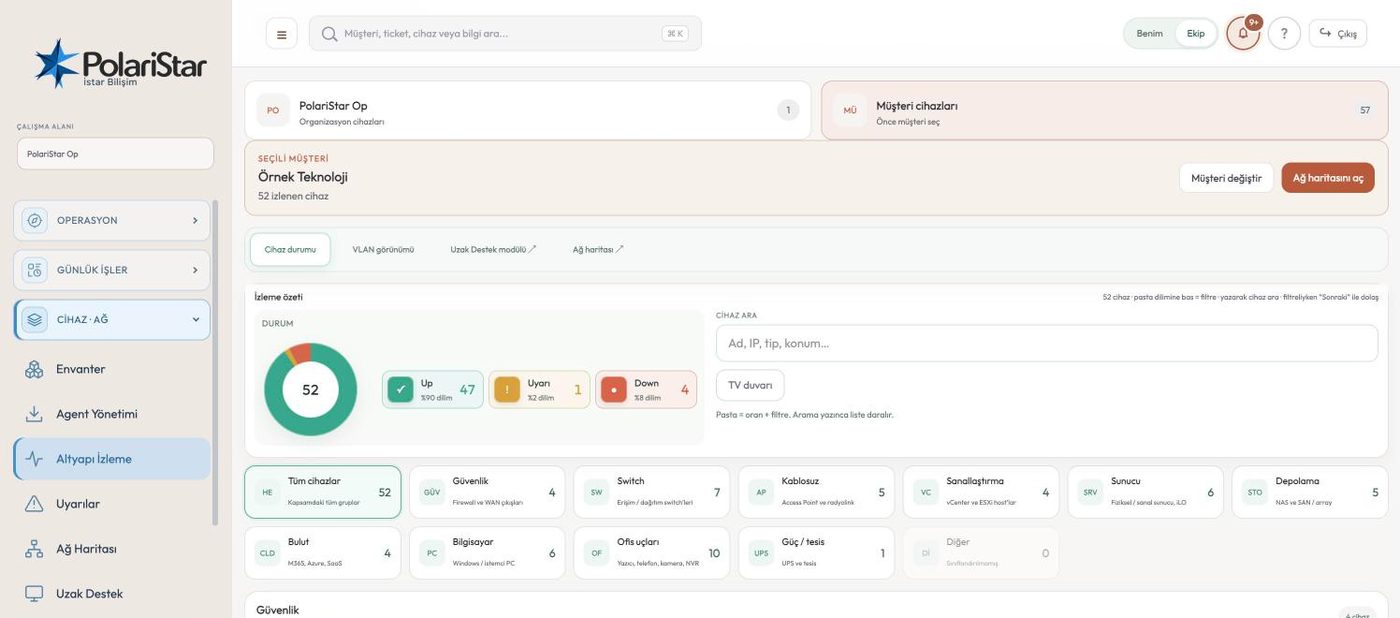
From the PolariStar panel, with demo data.

No agent mandate

Bringing a hundred-device network under monitoring does not mean a hundred installs: one collector goes on the LAN and the rest is read over the network. This is a deliberate break from approaches that put an agent or WMI on every host. Switches, storage and printers — things you cannot install anything on — are monitored the same way.

The protocol order is fixed

The default path is read-only SNMP, v2c or v3. Vendor REST or Redfish, also read-only, is optional and only opened when deeper data is needed. An agent on the host comes up only when PC or operating-system level detail is required — it is third in line, not first.

Nothing is written to devices

The collector pushes no configuration to any device; access is granted with read-only credentials. SNMP community strings and SSH details sit in encrypted columns. The flow is one-way: the collector pushes data to its own tenant, and no door is opened into the network from outside.

Device status at a glance

Up, warning and down sit as a ring above the list, and clicking a segment filters it. Cards refresh roughly once a minute, and “refresh now” triggers it by hand. SNMP port state follows the collector's scan interval, not the screen's refresh rate.

No invented alarms

Nonsense values from a wrong OID — an impossible fan speed, a PSU that is not there, a capacity the hardware could not physically hold — never become alarms. The value is either rejected or corrected against what the model is known to be. A monitoring system earns trust in the hours it stays quiet; one false alarm at 3am spends that trust for good.

Vendor profiles

For each vendor, the protocol, the enrichment step and the UI panel the data lands in are declared in a single profile file — the equivalent of a Zabbix template. Adding a brand means writing a profile, not writing code. Depth is being added vendor by vendor in the lab: NetApp ONTAP first, then Synology, HPE MSA and Dell storage, Cisco MDS and Brocade, then iLO, iDRAC and CIMC.

Panels split by purpose

Devices are grouped by role: security and gateway, switching and wireless, storage, endpoints. Environment readings (fans, PSUs, temperature) and network ports live in separate panels. Rather than dumping every SNMP value into one table, the data is split by what the person looking is actually after.

Thresholds and alerts kept apart

Device type groups and threshold values are defined on the Monitoring tab in Settings, and the monitoring screen applies them. The alarms they raise collect in their own list on the Alerts screen instead of crowding the live status view. Port state changes are recorded as well.

Wall display and linked tabs

The monitoring screen switches to a stripped-back wall display for a NOC screen, so the team on shift can read the state off the wall. Scope works like inventory: the whole organisation, or the selected customer (department in company mode). Network Map and Remote Support open as links from their tab headers.

The order monitoring data is collected inA three-step rising staircase. Step one is the default: read-only SNMP. Step two is optional: the vendor's read-only REST interface. Step three applies only when needed: an endpoint agent for PC and operating system data. The collection layer never writes to devices.How monitoring data is collected, in order1DEFAULTSNMP, read-onlyDevice, interface and sensor data overv2c or v3. No agent has to be put onevery device.2OPTIONALVendor REST, read-onlyNetApp ONTAP, IBM Storage Virtualize,Redfish (iLO, iDRAC, CIMC). Used whereSNMP does not reach far enough.3ONLY WHEN NEEDEDEndpoint agentA Windows agent, for PC and operatingsystem data alone. Network gear nevergets an agent.The collection layer never writes to devices: credentials are read-only and the flow runs one way (site → customer workspace).A wrong OID must not invent an alert; absurd readings are rejected or corrected from the device model.

A threshold breach, from the monitoring screen to a ticket

  1. 1The collector pollsThe collector on the customer LAN queries the device read-only over SNMP. The device's vendor profile says which OIDs to read and which panel the result belongs in.
  2. 2Nonsense is filtered outIf a returned value is impossible for that model, it does not become an alarm. It is rejected, or corrected from what the model is known to be, so no wrong number enters the record.
  3. 3Status reaches the screenClean data lands on the device card and shifts the distribution in the status ring. Because cards refresh about once a minute, the change shows up quickly.
  4. 4The threshold appliesIf the threshold set for that type group is crossed, the state turns to warning or down. Thresholds are defined per type group rather than per device, so one rule covers hundreds of them.
  5. 5The alert is listedThe alarm becomes its own record on the Alerts screen. The live status view stays clean and alarm history stays separate.
  6. 6The shift sees itWith the wall display up, the change is read off the NOC screen. Whoever is at a desk clicks the warning segment of the ring and gets only the affected devices.
  7. 7It becomes a work recordThe operator judges the situation and, if it warrants one, opens a ticket and links the device. Turning a verified alarm into a ticket on its own is on the roadmap; today a person makes that call.

Frequently asked

Is this a full RMM?

No, and we do not claim it is. What you have today is agentless monitoring, alerting and a link to inventory. Remote command and script execution, patching and software deployment are on the roadmap and will not ship before the approval, audit and rollback groundwork is in place.

Do I have to install something on my devices?

For switches, storage, BMCs and similar network gear, no — enabling read-only SNMP is enough. An agent goes on a host only when you want PC or server operating-system detail such as installed software, disks or users. The default path is agentless and the choice stays yours.

Which vendors are supported?

Depth is being added vendor by vendor: the sequence starts with NetApp ONTAP, then Synology, HPE MSA and Dell storage, Cisco MDS and Brocade, then iLO, iDRAC and CIMC. A device without a profile is still read at a basic level as far as its SNMP allows — reachability, interfaces, ports. If you run something not on the list, it is added by writing a profile.

Does iLO and iDRAC health data work?

Not fully yet. In the last trial, iLO port data came through but the health panel was left waiting for values; the item is open and being worked on. So do not count server BMC health as a finished feature today.

Will I be buried in false alarms?

The product rule exists to prevent exactly that: an absurd value from a wrong OID raises no alarm and is either rejected or corrected from the model. Thresholds are set per type group rather than per device, so tightening one rule takes effect across hundreds of them at once.

What exposure does the collector add to my network?

The collector is already inside the LAN and writes nothing to devices; the credentials it uses are read-only. Traffic is one-way, pushed outward by the collector, with no inbound connection into the network. Deployment and network detail are covered in the Collector module.

Who it helps

Network and systems administrators, MSP teams monitoring customer infrastructure remotely, and in-house IT teams watching their own data centre.

Related modules

See it on your own operation

Let us open a workspace for you and try it with your own customers and devices. We will guide you through setup and data migration.